



Interior Lights
Interior Light Switches
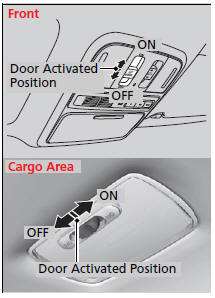
ON
The interior lights come on regardless of whether the doors are open or closed.
Door activated
The interior lights come on in the following situations:
When any of the doors are opened.
You unlock the driver's door.
You remove the key from the ignition switch.
Only the cargo area light comes on when the tailgate is opened.
OFF
The interior lights remain off regardless of whether the doors are open or closed.
Interior Light Switches
In the door activated position, the interior lights fade out and go off about 30 seconds after the doors are closed.
The lights go off after 30 seconds in the following situations:
When you unlock the driver's door but do not open it.
When you remove the key from the ignition switch but do not open a door.
The interior lights go off immediately in the following situations:
When you lock the driver's door.
When you close the driver's door with the key in the ignition switch.
When you turn the ignition switch to ON
 .
.
If you leave any of the doors open without the key in the ignition switch, the interior lights go off after about 15 minutes.
Models with multi-information display
You can change the interior lights dimming time.
Map Lights
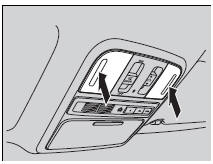
Front
The map lights can be turned on and off by pressing the lenses.
Second and third row
The map lights can be turned on and off by pressing the lenses when the front interior light switch is in the door activated position.
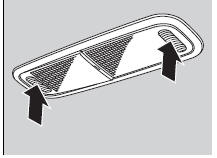
Map Lights
When the front interior light switch is in the door activated position and any door is open, the map light will not go off when you press the lens.
See also:
Playing a USB Flash Memory Device (EX-L model with navigation system)
Playing a USB Flash Memory Device (EX-L model with navigation system)
To Play a USB Flash Memory Device
This audio system can select and play the audio files from a USB flash memory
device with ...
Bluetooth HandsFreeLink
On models with navigation system Bluetooth HandsFreeLink (HFL)
allows you to place and receive phone calls using voice commands, without handling
your cell phone.
To use HFL, you need a Bluetooth ...
Audio System Basic Operation
Models without navigation system
To use the audio system function, the ignition switch must be in ACCESSORY
or ON
.
Use the selector knob or SETUP button to access some audio functions.
...