



Hard Disc Drive (HDD) Audio
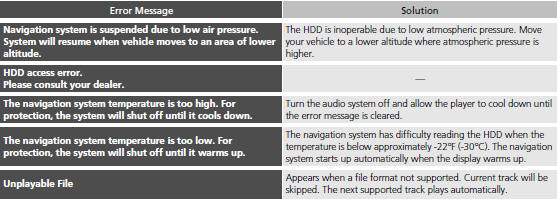
If an error occurs while playing the Hard Disc Drive (HDD) Audio, you may see the following error messages. If you cannot clear the error message, contact a dealer.
See also:
Audio System Theft Protection
Models without navigation system
The audio system is disabled when it is disconnected from the power source, such
as when the battery is disconnected or goes dead.
Reactivating the audio system
1. ...
Forward Collision Warning (FCW)
Alerts you when it detects the possibility of your vehicle colliding with the
vehicle in
front of yours.
If the system determines a collision is possible, it gives both visual and
audible alerts ...
Adjusting the Sound
1. Press the SETTINGS button.
2. Rotate to select Audio
Settings, then
press .
3. Rotate to select Sound, then press
.
Rotate to scroll through the
following
choices:
The SVC has four ...