



Compass Calibration
If the compass indicates the wrong direction, or the CAL indicator blinks, you need to manually calibrate the system.
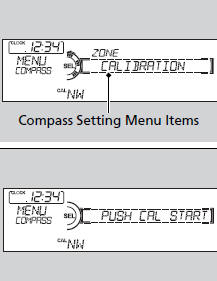
1. Turn the ignition switch to ON
 .
.
2. Press and hold the MENU button until the
display shows the compass setting menu
list.
3. Rotate  to select CALIBRATION,
then
press
to select CALIBRATION,
then
press  .
.
4. When the display changes to PUSH CAL
START, press  .
.
5. Drive the vehicle slowly in two circles.
-The compass starts to show a direction
after the calibration. The CAL indicator
goes off.
Calibrate the compass in an open area.
While setting the compass:
• The RETURN button returns to the previous screen.
• The MENU button cancels the setting mode.
These indications are used to show how to operate the selector knob.
Rotate to select.
Press to enter.
See also:
Button*
...
ABS (Anti-lock Brake System)
The ABS may not function correctly if you use an
incorrect tire type and size.
When the ABS indicator comes on while driving,
there may be a problem with the system.
While normal braking is no ...
Playing a CD
Your audio system supports audio CDs, CD-Rs and CD-RWs in either MP3, WMA, or
AAC format. With the CD loaded, press the CD button.
How to Select a File from a Folder with the Selector Knob (MP3/ ...