



Parking Brake
Use the parking brake to keep the vehicle stationary when parking.
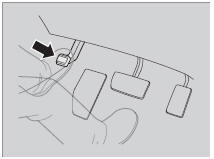
To apply:
Depress the parking brake pedal down with your foot.
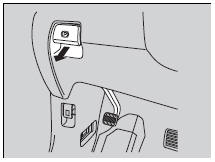
To release:
1. Depress the brake pedal.
2. Pull the release handle fully.
Parking Brake
NOTICE
Release the parking brake fully before driving. The rear brakes and axle can be damaged if you drive with the parking brake applied. If you start driving without fully releasing the parking brake, a buzzer sounds as a warning, and RELEASE PARKING BRAKE appears on the multi-information display.
Always apply the parking brake when parking.
See also:
Gauges
Information Display
The information display consists of three segments. The upper segment displays
current fuel mileage, the second segment displays the odometer, average fuel mileage,
range ...
Playing a USB Flash Drive
Your audio system reads and plays sound files on a USB flash drive in either
MP3, WMA or AAC 1 format.
Connect your USB flash drive to the USB adapter cable, then press the USB/AUX
button.
How ...
Parking Your Vehicle
When Stopped
1. Depress the brake pedal firmly.
2. Firmly apply the parking brake.
3. Move the shift lever from to
.
4. Turn off the engine.
Always set the parking brake firmly, in particular i ...