



Compatible iPod® and USB Flash Drives
iPod® Model Compatibility
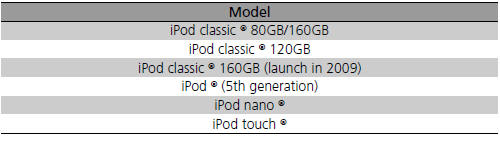
iPod® Model Compatibility
This system may not work with all software versions of these devices.
USB Flash Drives
Use a recommended USB flash drive of 256 MB or higher.
Some digital audio players may not be compatible.
Some USB flash drives (e.g., a device with security lockout) may not work.
Some software files may not allow for audio play or text data display.
Some versions of MP3, WMA, or AAC formats may be unsupported.
USB Flash Drives
Files on the USB flash drive are played in their stored order. This order may be different from the order displayed on your PC or device.
See also:
Power Steering Fluid Check
4-cylinder models
Specified fluid: Honda Power Steering Fluid
We recommend that you check the power steering fluid level every time you
refuel.
Check when the engine is not running.
1. Look ...
Changing the Rear Wiper Blade Rubber
1. Raise the wiper arm off.
2. Pivot the bottom end of the wiper blade up until it comes off from the wiper
arm.
3. Slide the blade out of the wiper.
4. Remove the retainers from wiper blade ...
Playing the AM/FM Radio
Auto Select
Use the auto select feature to scan both bands and store the strongest station
in each preset.
1. Press the AUDIO button.
2. Move to select AUDIO MENU.
3. Rotate to select A.S ...