



Customizing the Auto Door Locking/Unlocking Setting*
You can customize the auto door locking/unlocking setting to your liking using the master door lock switch.
■List of the Auto Door Locking/Unlocking Customizable Options
■ Auto door locking

■ Auto door unlocking
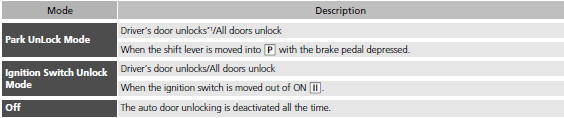
*1:Default setting
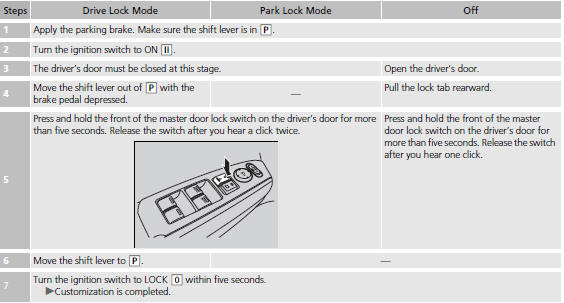
■Customizing Flow for Auto Door Locking Options
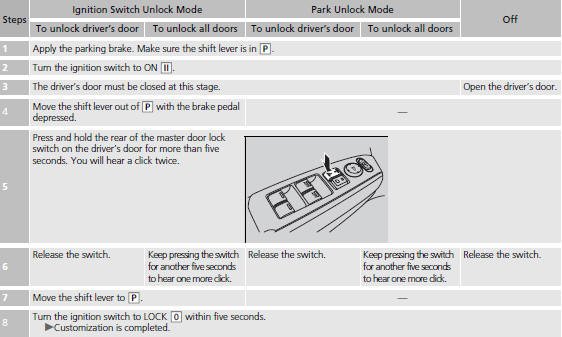
■Customizing Flow for Auto Door Unlocking Options
See also:
A Few Words About Safety
Your safety, and the safety of others, is very important. And
operating this vehicle safely is an important responsibility.
To help you make informed decisions about safety, we have
provided oper ...
Tire Labeling
The tires that came on your vehicle have a number of markings. Those you should
be aware of are described below.
Tire Sizes
Whenever tires are replaced, they should be replaced with tires of the ...
Towing Preparation
■Towing Load Limits
Your vehicle can tow a trailer if you carefully observe the load limits, use
the proper
equipment, and follow the towing guidelines. Check the load limits before
drivin ...