



Power Door Mirrors
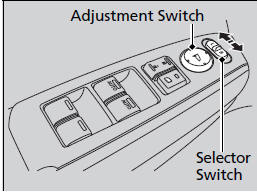
You can adjust the door mirrors when the
ignition switch is in ON  .
.
■ Mirror position adjustment
L/R selector switch: Select the left or right
mirror. After adjusting the mirror, return the
switch to the center position.
Mirror position adjustment switch: Press
the switch left, right, up, or down to move the
mirror.
■Reverse Tilt Door Mirror*
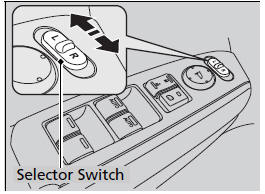
If activated, either side door mirror
automatically tilts downward when you put
the shift lever in  ; this improves
close-in
visibility on the selected side of the vehicle
when reversing. The mirror automatically
returns to its original position when you shift
out of
; this improves
close-in
visibility on the selected side of the vehicle
when reversing. The mirror automatically
returns to its original position when you shift
out of  .
.
To activate this feature, turn the ignition
switch to ON , and slide the
selector
switch to the left or right side.
■Expanded View Driver’s Mirror
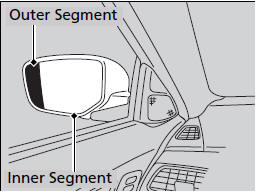
The driver side door mirror has outer and inner segments.
The outer segment is slightly curved to provide a wider angle view than a standard flat mirror.
This wider view may help you check areas that are not visible using a standard door mirror.
Objects visible in the outer segment of the driver side door mirror appears smaller than objects in the rest of the mirror. But in fact, they are closer than they appear.
Do not rely on your mirrors. Always look to the side and behind your vehicle before changing lanes.
See also:
Rear Window Defogger
The rear window defogger will clear fog, frost, and thin ice from the window.
Push the defogger button to turn it on and off. The indicator in the button comes
on to show the defogger is on. It ...
Playing Internet Radio
U.S. models
Compatible phones only
Connect a compatible phone through Bluetooth®.
iPhone
You can also connect the phone using your dock connector to the USB adapter
cable.
Make sure the audi ...
Paddle Shifters
● Paddle shifters allow you to shift gears much like a
manual transmission (1st through 6th). This is useful for
engine braking.
● D-paddle shift mode: The transmission will shift back ...