



Hard Disc Drive (HDD) Audio
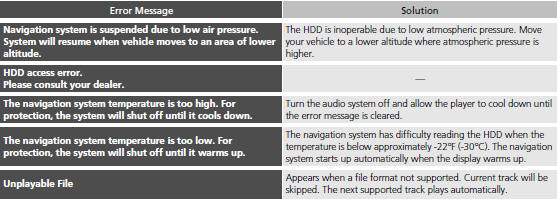
If an error occurs while playing the Hard Disc Drive (HDD) Audio, you may see the following error messages. If you cannot clear the error message, contact a dealer.
See also:
Key Types and Functions
This vehicle comes with the following keys:
■Master Keys
Use the key to start and stop the engine, and
to lock and unlock the doors, tailgate, and
fuel fill door.
You can also use the r ...
Voice Control Operation
Your vehicle has a voice control system that allows hands-free operation of
most of
the navigation system functions.
The voice control system uses the
(Talk) and (hang-up/back) buttons
on ...
Winter Tires
If driving on snowy or frozen roads, mount all season marked M+S
tires, snow tires,
or tire chains; reduce speed; and maintain sufficient distance between vehicles
when
driving.
Be particular ...