



Rearview Camera
About Your Rearview Camera
Models without touch screen
An image of the rear view is shown in your vehicle’s rearview mirror when the
shift
lever is moved to  .
.
■Rearview Camera Display Area
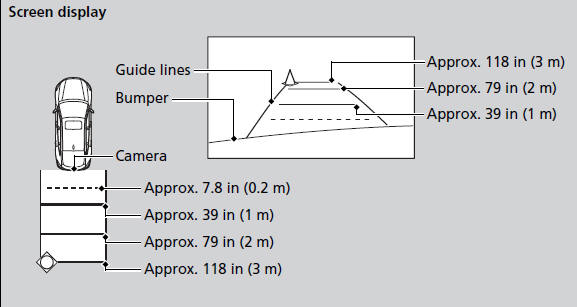
The rearview camera has a unique lens that makes objects appear closer or further than they actually are.
The rear camera view is restricted.
You cannot see the corner ends of the bumper and what is underneath the bumper.
Visually confirm that it is safe to drive on before backing up. Do not rely on the rearview display, which does not give you complete information.
Certain conditions (such as weather, lighting, and high temperatures) may also restrict the rear view.
Use a soft, moist cloth to keep the lens clean and free of debris.
You can select to have the guide lines appearing on
the rearview camera display while the shift lever is in
. Press the Auto button for about
five seconds to
turn them on or off.
The rearview display is turned on every time you shift
to .
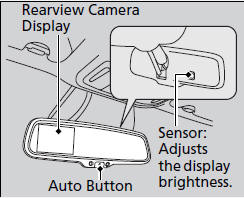
The rearview mirror gets hot if the rearview display is used for an extended period.
See also:
Exhaust Gas Hazard
Carbon Monoxide Gas
The engine exhaust from this vehicle contains carbon monoxide, a colorless,
odorless, and highly toxic gas. As long as you properly maintain your vehicle,
carbon
monoxide gas ...
Locking/Unlocking the Doors Using a Key
Fully insert the key and turn it.
Locking/Unlocking the Doors Using a Key
When you lock the driver's door with a key, all of the other doors and tailgate
lock at the same time. When unlocking ...
If the Low Oil Pressure Indicator Comes On
■ Reasons for the indicator to come on
Comes on when the engine oil pressure is low.
■ What to do as soon as the indicator comes on
1. Immediately park the vehicle in a safe place.
2 ...