



Checking the Engine
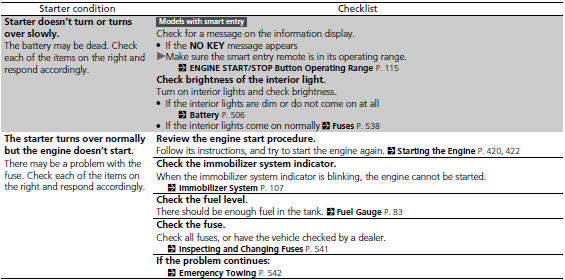
If the engine does not start, turn the ignition switch to START (e*1 and check the starter.
If you must start the vehicle immediately, use an assisting vehicle to jump start it.
See also:
If a Tire Goes Flat
Changing a Flat Tire
If a tire goes flat while driving, grasp the steering wheel firmly, and brake
gradually to reduce speed. Then, stop in a safe place. Replace the flat tire with
a compact spare ...
Rearview Camera and Monitor
On EX-L model with navigation system
Whenever you shift to reverse (R) with the ignition switch in the ON (II) position,
the rearview is shown on the navigation system screen.
For the best pictu ...
Interior Care
Use a damp cloth with a mixture of mild detergent and warm water to remove
dirt.
Use a clean cloth to remove detergent residue.
Do not spill liquids inside the vehicle.
Electrical devices and ...