



Shift Lever Does Not Move
Follow the procedure below if you cannot move the shift lever out of the (P position.
■Releasing the Lock
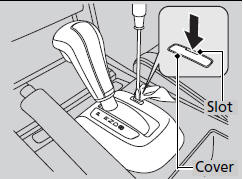
1. Set the parking brake.
Models without smart entry system
2. Remove the key from the ignition switch.
Models with smart entry system
2. Remove the built-in key from the smart
entry remote.
All models
3. Wrap a cloth around the tip of a small flattip
screwdriver. Put it into the shift lock
release slot as shown in the image, and
remove the cover.
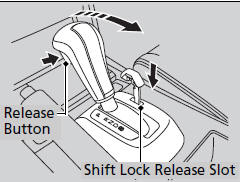
4. Insert the key into the shift lock release slot.
5. While pushing the key down, press the shift
lever release button and place the shift lever
into  .
.
-The lock is now released. Have the shift
lever checked by a dealer as soon as
possible.
See also:
iPod®/USB Flash Drive
If an error occurs while playing an iPod® or USB flash drive, you may see the
following error messages. If you cannot clear the error message, contact a
dealer.
Audio system without touch screen
...
Playing Internet Radio
U.S. models
Compatible phones only
Connect a compatible phone through Bluetooth®.
iPhone
You can also connect the phone using your dock connector to the USB adapter
cable.
Make sure the audi ...
Setting the Clock
On models without navigation system
To set the time, press the CLOCK button until you hear a beep. The displayed
time begins to blink.
Change the hours by pressing the H (hour) button until the nu ...