



Auto Door Locking/Unlocking
Your vehicle locks all doors and unlocks the driver’s door automatically when a certain condition is met.
Auto Door Locking
Drive lock mode
All doors and the tailgate lock when the vehicle’s speed reaches about 10 mph (15 km/h).
Auto Door Unlocking
Park unlock mode
The driver’s door unlocks when the shift lever is moved into
 with the brake pedal depressed.
Auto Door Locking/Unlocking
Models without multi-information display
You can turn off or change to another auto door locking/unlocking setting using the master door lock switch.
Models with multi-information display
You can turn off or change to another auto door locking/unlocking setting using the multi-information display.
Customizing the Auto Door Locking/Unlocking Setting
You can customize the auto door locking/unlocking setting to your liking using the master door lock switch.
List of the Auto Door Locking/Unlocking Customizable Options
Auto door locking

Auto door unlocking
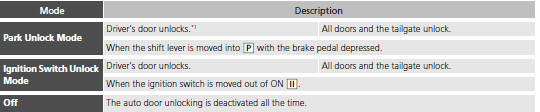
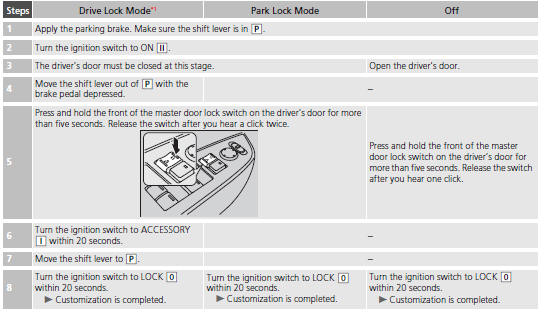
Customizing Flow for Auto Door Locking Options
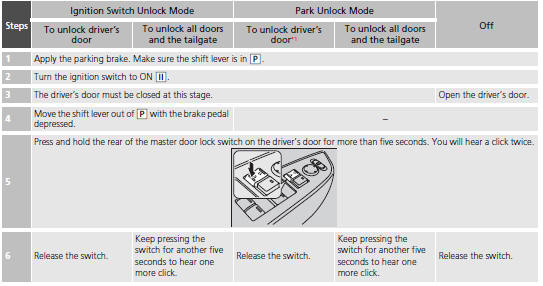
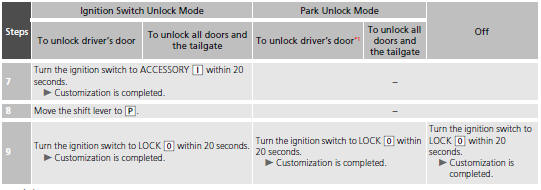
Customizing Flow for Auto Door Unlocking Options
See also:
Rear Defogger/Heated Door Mirror Button
Press the rear defogger and heated door mirror button to defog the rear window
and mirrors when the ignition switch is in ON
.
Rear Defogger/Heated Door Mirror Button
NOTICE
When cleaning the ...
Features
Audio System
Audio Remote Controls
- VOL (Volume) Button
Press and release to adjust the volume up/ down.
- MODE Button
Press and release to change the audio mode: FM1/FM2/AM/XM1* ...
Interior Care
Use a damp cloth with a mixture of mild detergent and warm water to remove dirt.
Use a clean cloth to remove detergent residue.
Cleaning Seat Belts
Use a soft brush with a mixture of mild soap and ...