



Opening and Closing the Windows
Opening/Closing the Power Windows
The power windows can be opened and closed when the ignition switch is in ON
 , using the switches on the doors.
The driver side switches can be used to open and close all of the windows.
, using the switches on the doors.
The driver side switches can be used to open and close all of the windows.
The power window lock button on the driver side must be switched off (not pushed in, indicator off) to open and close the windows from anywhere other than the driver's seat.
When the power window lock button is pushed in, the indicator comes on and you can only operate the driver's window. Turn the power window lock button on when children are in the vehicle.
Opening/Closing the Power Windows
WARNING
Closing a power window on someone's hands or fingers can cause serious injury. Make sure your passengers are away from the windows before closing them.
The power windows can be operated for up to 10 minutes after you turn the ignition switch off. Opening either front door cancels this function.
Auto Reverse
If a power window senses resistance when closing automatically, it will stop closing and reverse direction. The driver’s window auto reverse function is disabled when you continuously pull up the switch. The auto reverse function stops sensing when the window is almost closed to ensure that it fully closes.
Opening/Closing Windows with Auto-Open/Close Function
Automatic operation
To open: Push the switch down firmly.
To close: Pull the switch up firmly.
The window opens or closes completely. To stop the window at any time, push or pull the switch briefly.
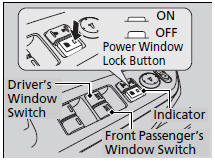
Manual operation
To open: Push the switch down lightly.
To close: Pull the switch up lightly.
Release the switch when the window reaches the desired position.
Opening/Closing Windows without Auto-Open/Close Function
To open: Push the switch down.
To close: Pull the switch up.
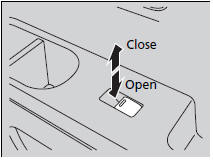
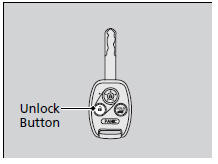
Opening the Windows and Moonroof* with the Remote Transmitter
To open: Press the unlock button twice within 10 seconds and hold it down for the second time. If the windows stop midway, repeat the procedure.
Opening/Closing the Windows and Moonroof with the Key
To open: Unlock the driver’s door with the key. Within 10 seconds of returning the key to the central position, turn the key in the unlock direction and hold it there.
To close: Lock the driver’s door with the key. Within 10 seconds of returning the key to the central position, turn the key in the lock direction and hold it there.
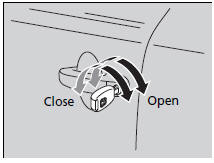
Release the key to stop the windows/ moonroof at the desired position. If you want further adjustment, repeat the same operation.
See also:
HFL Menus
The ignition switch must be in ACCESSORY
or ON
to use HFL.
■ Phone Settings screen
1. Press the SETTINGS button.
2. Rotate to select Phone
Settings, then
press .
To use HFL, you mus ...
Lockout prevention system
The doors and the tailgate cannot be locked when the key is in the ignition switch,
and any door or the tailgate is open.
Locking/Unlocking the Doors Using a Key
When you lock the driver's door ...
Deleting all HDD Data
Reset all the menu and customized settings, and delete all music data on the
HDD.
1. Turn on the audio system and select the
HDD mode.
2. Press the SETTINGS button.
3. Rotate to select Audio
...