



Adding Engine Oil
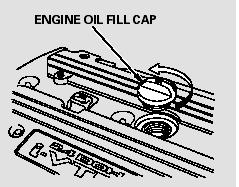
Unscrew and remove the engine oil fill cap on top of the valve cover.
Pour in the oil slowly and carefully you do not spill any. Clean up any spills immediately. Spilled oil could damage components in the engine compartment.
Reinstall the engine oil fill cap, and tighten it securely. Wait a few minutes, and recheck the oil level on the engine oil dipstick. Do not fill above the upper mark; you could damage the engine.
Recommended Engine Oil
Oil is a major contributor to your engine’s performance and longevity.
Always use a premium-grade 0W-20 detergent oil displaying the API Certification Seal. This seal indicates the oil is energy conserving, and that it meets the American Petroleum Institute’s latest requirements.
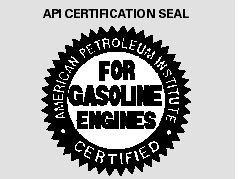
Honda Motor Oil is the preferred 0W-20 lubricant for your vehicle. It is highly recommended that you use Honda Motor Oil in your vehicle for optimum engine protection. Make sure the API Certification Seal says ‘‘For Gasoline Engines’’.
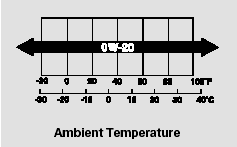
The oil viscosity or weight is provided on the container’s label.
0W-20 oil is formulated for yearround protection of your vehicle to improve cold weather starting and fuel economy.
Synthetic Oil
You may use a synthetic motor oil if it meets the same requirements given for a conventional motor oil: it displays the API certification seal, and it is the proper weight. You must follow the oil and filter change intervals shown on the information display.
Engine Oil Additives
Your vehicle does not require any oil additives. Additives may adversely affect the engine or transmission performance and durability.
See also:
Automatic Transmission
Creeping
The following conditions cause the engine to run at high revolutions, and increase
creeping:
Immediately after the engine starts.
When the climate control system is in use.
Keep the brak ...
Speed Dial
Up to 20 speed dial numbers can be stored per phone.
To store a speed dial number:
1.Press the PHONE button or the
button.
2. Rotate to select Phone Setup,
then press .
- ...
Auto Door Locking/Unlocking
Your vehicle locks all doors and unlocks the driver’s door automatically when
a certain condition is met.
Auto Door Locking
Drive lock mode
All doors and the tailgate lock when the vehicle’s s ...