



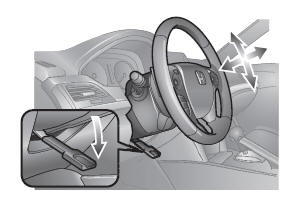
Steering Wheel
● To adjust, push the adjustment lever down, adjust to the desired position, then lock the lever back in place.
See also:
Power Door Mirrors
You can adjust the door mirrors when the ignition switch is in ON
.
Mirror position adjustment
L/R selector switch: Select the left or right mirror. After adjusting
the mirror, return the switc ...
Refueling
Fuel recommendation: Unleaded gasoline with a pump octane number 87 or higher
required
Fuel tank capacity: 21 US gal (79.5 L)
1. Pull the fuel fill door release handle.
2. Turn the fuel fill cap ...
Setting the Clock
Models with audio/information screen
You can adjust the time in the clock display, using the CLOCK button with the
ignition switch in ON .
1.Press the CLOCK button to access the clock adjustment ...