



Playing Internet Radio
Connect a compatible phone through Bluetooth®.
iPhone
You can also connect the phone using your dock connector to the USB adapter cable.
Make sure the audio setting is correct for the connection type.
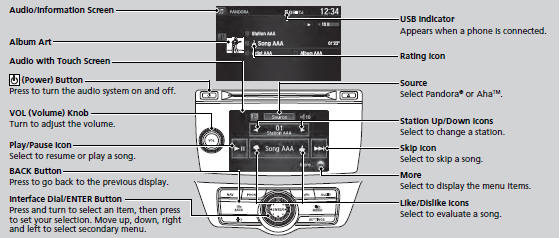
Select Source to select Pandora or Aha mode.
Pandora®, the Pandora logo, and the Pandora trade dress are trademarks or registered trademarks of Pandora Media, Inc., used with permission. Pandora is currently available exclusively in the United States.
feature, visit www.handsfreelink.honda.com, or call (888) 528-7876.
Pandora® is a personalized Internet radio service that selects music based on an artist, song, or genre a user enters, and streams what is likely to be of interest.
To use this service in your vehicle, the Pandora® app must first be installed on your phone. Visit www.pandora.com. for more information.
If you cannot operate Pandora® through the audio system, it may be streaming through Bluetooth® Audio. Make sure Pandora® mode on your audio system is selected.
■Pandora® Menu
You can operate some of the Pandora® menu items from your vehicle’s audio system. The available items are:
• Skip Forward
• Dislike
• Play/Pause
• Bookmark This Song
• Station List
• Bookmark This Artist
• Like
• Change Source
■ Operating a menu item
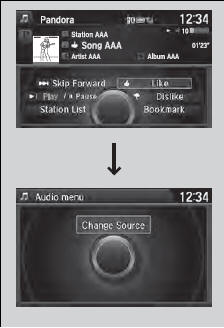
The menu items are shown in the lower half of the audio/information screen.
Rotate  to select an item and press
 .
.
To select Change Source, press the MENU
button, then press  .
.
You can control Pandora® using voice commands.
Available operating functions vary on software versions. Some functions may not be available on the vehicle’s audio system.
If there is a problem, you may see an error message on the audio/information screen.
There are restrictions on the number of songs you can skip or dislike in a given hour.
■AhaTM Menu
You can operate some of the AhaTM menu items from your vehicle’s audio system.
The available items are:
• Like
• View text
• Dislike
• View list
• Play/Pause
• Reply
• 15sec Back
• Change Source
• 30sec Skip
• Stations
The menu items are shown in the lower half of the audio/information screen.
Rotate to select an item and press
.
To select Change Source or Stations, press
the MENU button, then press .
AhaTM by Harman is a cloud-based service that organizes your favorite web content into live radio stations. You can access podcasts, internet radio, location-based services, and audio updates from social media sites.
You can control AhaTM Radio using voice commands.
Available operating functions vary on software versions. Some functions may not be available on the vehicle’s audio system.
If there is a problem, you may see an error message on the audio/information screen.
The menu items vary depending on the station you selected.
To use this service in your vehicle, the HondaLink app must be installed on your phone. Visit owners.honda.com/apps for more information.
You must have a previously set up Aha account prior to using the service in your vehicle. Visit www.aharadio.com for more information.
See also:
Cruise Control
Cruise control allows you to maintain a set speed above 25 mph (40 km/h) without
keeping your foot on the accelerator pedal. It should be used for cruising on straight,
open highways. It is not re ...
Playing a CD
Your audio system supports audio CDs, CD-Rs and CD-RWs in either MP3, WMA, or
AAC*1 format. With the CD loaded, select the CD mode.
NOTICE
Do not use CDs with adhesive labels. The label can
caus ...
Checking the Battery
Check the battery condition monthly. Look at the test indicator window and check
the terminals for corrosion.
If your vehicle's battery is disconnected or goes dead:
- The audio system ...