



Brake System
■Parking Brake
Use the parking brake to keep the vehicle stationary when parking.
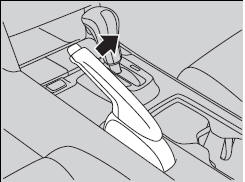
To apply:
Pull the lever fully up without pressing the
release button.
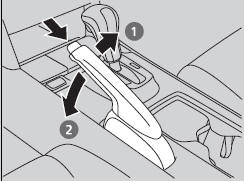
To release:
1. Pull the lever slightly, and press and hold
the release button.
2. Lower the lever down all the way, then
release the button.
NOTICE
Release the parking brake fully before driving. The rear brakes and axle can be damaged if you drive with the parking brake applied.
If you start driving without fully releasing the parking brake, a buzzer sounds as a warning.
Always apply the parking brake when parking.
■Foot Brake
Your vehicle is equipped with disc brakes at all four wheels. A vacuum power assist helps reduce the effort needed on the brake pedal. The brake assist system increases the stopping force when you depress the brake pedal hard in an emergency situation. The anti-lock brake system (ABS) helps you retain steering control when braking very hard.
Check the brakes after driving through deep water, or if there is a buildup of road surface water. If necessary, dry the brakes by lightly depressing the pedal several times.
If you hear a continuous metallic friction sound when applying the brakes, the brake pads need to be replaced. Have the vehicle checked by a dealer.
Constantly using the brake pedal while going down a long hill builds up heat, which reduces the brake effectiveness. Apply engine braking by taking your foot off the accelerator pedal and downshifting to a lower gear.
Do not rest your foot on the brake pedal while driving, as it will lightly apply the brakes and cause them to lose effectiveness over time and reduce pad life. It will also confuse drivers behind you.
See also:
Audio/Information Screen
Displays the audio status and wallpaper. From this screen, you can go to
various
setup options.
■Switching the Display
Using the button
Press the (display)
button to change the display ...
Playing a CD
Your audio system supports audio CDs, CD-Rs and CD-RWs in either MP3 or WMA format.
With the CD loaded, press the CD button.
How to Select a File from a Folder with the Interface Dial (MP3/WMA/A ...
Transmission Fluid
■Automatic Transmission Fluid
Specified fluid: Honda ATF DW-1 (automatic transmission fluid)
Have a dealer check the fluid level and replace if necessary.
NOTICE
Do not mix Honda ATF DW-1 wi ...