



Oil Check
We recommend that you check the engine oil level every time you refuel.
Park the vehicle on level ground.
Wait approximately three minutes after turning the engine off before you check the oil.
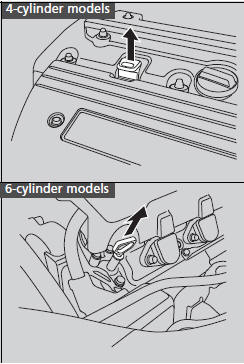
1. Remove the dipstick (orange handle).
2. Wipe the dipstick with a clean cloth or
paper towel.
3. Insert the dipstick back all the way into its
hole.
If the oil level is near or below the lower mark, slowly add oil being careful not to overfill.
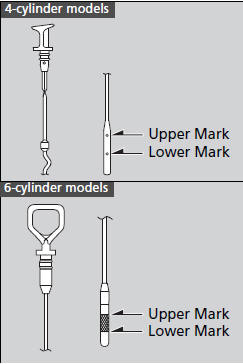
4. Remove the dipstick again, and check the level. It should be between the upper and lower marks. Add oil if necessary.
See also:
If the Low Tire Pressure/TPMS Indicator Comes On or Blinks
Reasons for the indicator to come on or blink
A tire pressure is significantly low. If there is a problem with the TPMS or
the compact spare tire is installed, the indicator blinks for about one m ...
Towing Your Vehicle
Your vehicle is not designed to be towed behind a motor home. If your vehicle
needs to be towed in an emergency, refer to the emergency towing information. ...
Playing a CD
Your audio system supports audio CDs, CD-Rs and CD-RWs in either MP3, WMA, or
AAC format. With the CD loaded, press the CD button.
How to Select a File from a Folder with the Selector Knob (MP3/ ...