



Rear License Plate Light Bulb
When replacing, use the following bulb.
Rear License Plate Light: 5 W
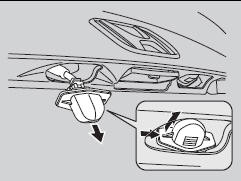
1. Push the left edge of the lens to the right and pull out the licence light assembly.
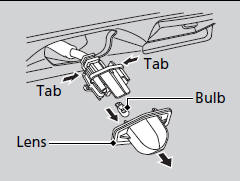
2. Push the tabs to remove the lens.
3. Remove the old bulb.
4. Insert a new bulb.
See also:
Adding Engine Oil
Unscrew and remove the engine oil fill cap on top of the valve cover.
Pour in the oil slowly and carefully you do not spill any. Clean up any spills
immediately. Spilled oil could damage componen ...
Playing a PC card (EX-L model with navigation system)
Playing a PC card (EX-L model with navigation system)
To Play a PC Card
You operate the PC card player with the same controls used for the radio and
the disc player. To load or play a card, the ...
Audio System Theft Protection
The audio system is disabled when it is disconnected from the power source,
such as
when the battery is disconnected or goes dead.
■ Reactivating the audio system
Audio system without touch ...