



Lights
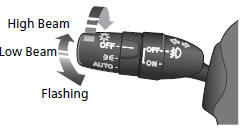
Light Control Switches
See also:
Tire Pressure Monitoring System (TPMS) -Required Federal Explanation
Each tire, including the spare (if provided), should be checked
monthly when cold and inflated to the inflation pressure
recommended by the vehicle manufacturer on the vehicle placard
or tire infla ...
Exhaust Gas Hazard
Carbon Monoxide Gas
The engine exhaust from this vehicle contains carbon monoxide, a colorless,
odorless, and highly toxic gas. As long as you properly maintain your vehicle,
carbon
monoxide gas ...
Playing an iPod®
Connect the iPod® using your dock connector to the USB adapter cable, then press
the USB/AUX button.
How to Select a File from the iPod® Menu
1. Press to display the iPod® menu.
2.Rotate ...