



Playing the XM® Radio
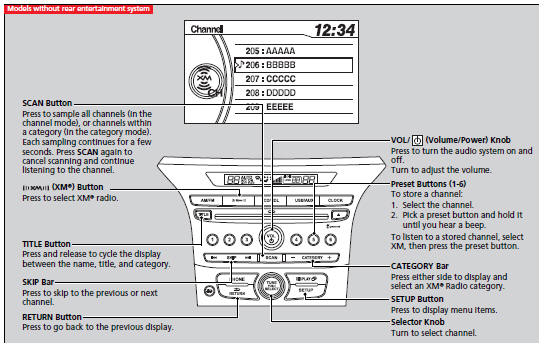
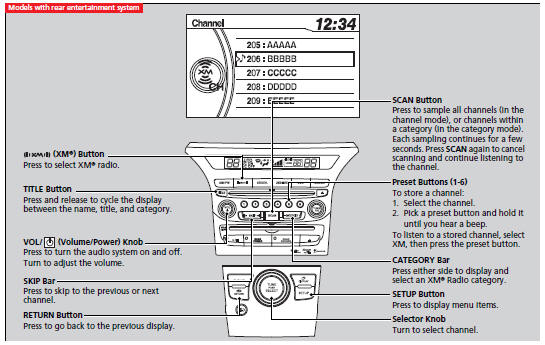
To Play the XM® Radio
1. Press the  button to select the
XM® radio band (XM1 or XM2).
button to select the
XM® radio band (XM1 or XM2).
2. Press and hold the TITLE button to switch between the channel mode and category mode.
If you press the SETUP button, rotate
 to select XM Mode, and press
 .You can select channel mode
or category mode by turning and pressing the selector knob.
.You can select channel mode
or category mode by turning and pressing the selector knob.
3.Select a channel using the TUNE (
), SKIP, CATEGORY, SCAN, or preset
buttons.
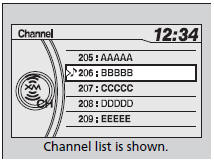
To Select a Channel from a List
1. Press to display a channel
list.
2.Rotate to select a channel, then
press .
Playing the XM® Radio
In the channel mode, all available channels are selectable. In the category mode, you can select a channel within a category (Jazz, Rock, Classical, etc.). You can store twelve XM® stations in the preset buttons. XM1 and XM2 let you store six stations each. There may be instances when XM® Radio does not broadcast all the data fields (artist name, title). This does not indicate a problem with your audio system.
See also:
Customized Features*
Use the audio/information screen to customize certain features.
■ How to customize
Models without navigation system
With the ignition switch in ON ,
press and hold the DISP button, then rot ...
Storing a Position in Memory
1. Turn the ignition switch to ON
. Adjust the driver’s seat and the door mirrors to the desired position.
2. Press the SET button.
You will hear a beep, and the memory button indicator ...
Safety When Performing Maintenance
Some of the most important safety precautions are given here. However, we cannot
warn you of every conceivable hazard that can arise in performing maintenance. Only
you can decide whether or not you ...