



Playable Discs
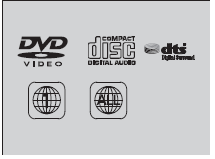
The discs that come with these labels can be played in your vehicle’s rear entertainment system. Also look for the region code of 1 or ALL on the package or jacket on the disc. DVD-ROMs are not playable in this unit.
Playable Discs
This product incorporates copyright protection technology that is protected by U.S. patents and other intellectual property rights. Use of this copyright protection technology must be authorized by Macrovision, and is intended for home and other limited viewing uses only unless otherwise authorized by Macrovision. Manufactured under license under U.S. Patent’s: 5,451,942; 5,956,674; 5,974,380; 5,978,762; 6,487,535 & other U.S. and worldwide patents issued & pending. DTS and DTS Digital Surround are registered trademarks and the DTS logos and Symbol are trademarks of DTS, Inc. All Rights Reserved. Reverse engineering or disassembly is prohibited. Manufactured under license from Dolby Laboratories. Dolby, Pro Logic, MLP Lossless and the double-D symbol are trademarks of Dolby Laboratories.
See also:
Rear License Plate Light Bulb
When replacing, use the following bulb.
Rear License Plate Light: 5 W
1. Remove the lens by prying on the edge of the lens using a flat-tip screwdriver.
- Wrap the flat-tip screwdriver with ...
Using the Tailgate Release Button
When all the doors are unlocked, the tailgate
is unlocked. Press the tailgate release button
and lift open the tailgate.
Models with smart entry system
Even if the tailgate is locked, you can op ...
Automatic Transmission
■Creeping
The engine runs at a higher idle speed and creeping increases.
Keep the brake pedal firmly depressed when stopped.
■Kickdown
Quickly depressing the accelerator pedal while ...