



Transmission Fluid
Automatic Transmission Fluid
Specified fluid: Honda ATF DW-1 (automatic transmission fluid)
Check the fluid level when the engine is at normal operating temperature.
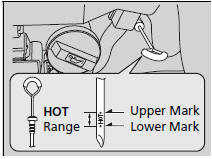
1. Park on level ground, and start the engine.
2. Wait until the radiator fan starts and then turn off the engine.
- Perform step 3 after waiting for about 60 seconds (less than 90 seconds).
3. Remove the dipstick (yellow loop) from the transmission and wipe it with a clean cloth.
4. Insert the dipstick all the way back into the transmission securely, as shown in the image.
5. Remove the dipstick and check the fluid level.
- It should be between the upper and lower marks in the HOT range.
6. If the level is below the lower mark, add fluid into the dipstick hole to bring it to the level between the upper and lower marks, and have your vehicle checked by a dealer immediately.
Automatic Transmission Fluid
NOTICE
Do not mix Honda ATF DW-1 with other transmission fluids.
Using a transmission fluid other than Honda ATF DW-1 may adversely affect the operation and durability of your vehicle's transmission, and damage the transmission. Any damage caused by using a transmission fluid that is not equivalent to Honda ATF DW-1 is not covered by Honda's new vehicle warranty.
NOTICE
Pour the fluid slowly and carefully so you do not spill any. Clean up any spills immediately; they can damage components in the engine compartment.
See also:
Driving Preparation
Check the following items before you start driving.
■Exterior Checks
• Make sure there are no obstructions on the windows, door mirrors, exterior
lights, or other parts of the vehicle.
- R ...
Changing the Engine Oil and Oil Filter
You must change the engine oil and oil filter regularly in order to maintain
the engine's lubrication. The engine may be damaged if they are not changed regularly.
Change the oil and filter in a ...
If the EngineWon’t Start
Diagnosing why the engine won’t start falls into two areas, depending on what
you hear when you turn the ignition switch to the START (III) position:
You hear nothing, or almost nothing. The engi ...