



HFL Menus
The ignition switch must be in ACCESSORY
 or ON
or ON
 to use HFL.
 or
or

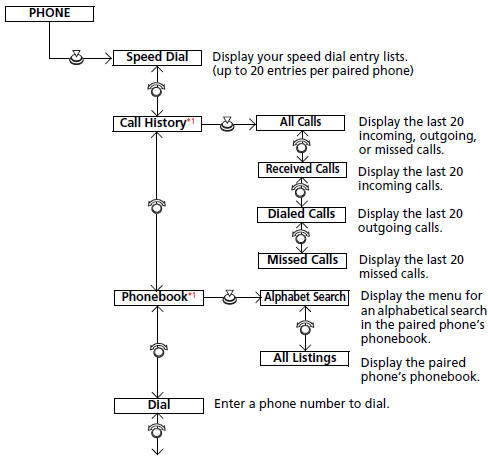
HFL Menus
To use HFL, you must first pair your Bluetoothcompatible cell phone to the system while the vehicle is parked.
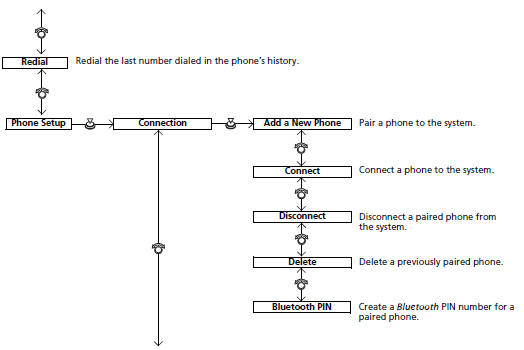
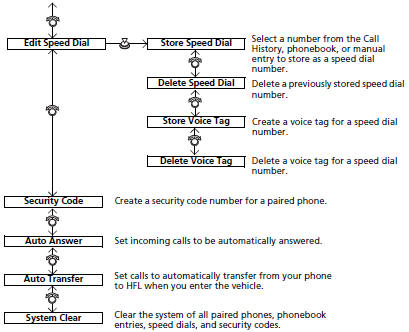
- Phone Setup
- To Create a Security Code
- Automatic Answering
- Automatic Transferring
- To Clear the System
- Automatic Import of Cellular Phonebook and Call History
- Speed Dial
- Making a Call
- Receiving a Call
- Options During a Call
See also:
Inspection and Maintenance
For your safety, perform all listed inspections and maintenance to keep your
vehicle
in good condition. If you become aware of any abnormality (noise, smell,
insufficient
brake fluid, oil residu ...
Oil Check
We recommend that you check the engine oil level every time you refuel.
Park the vehicle on level ground.
Wait approximately three minutes after turning the engine off before you check
the oil.
...
Safety When Performing Maintenance
Some of the most important safety precautions are given here.
However, we cannot warn you of every conceivable hazard that can arise in
performing maintenance. Only you can decide whether or not y ...